

What a Task carries
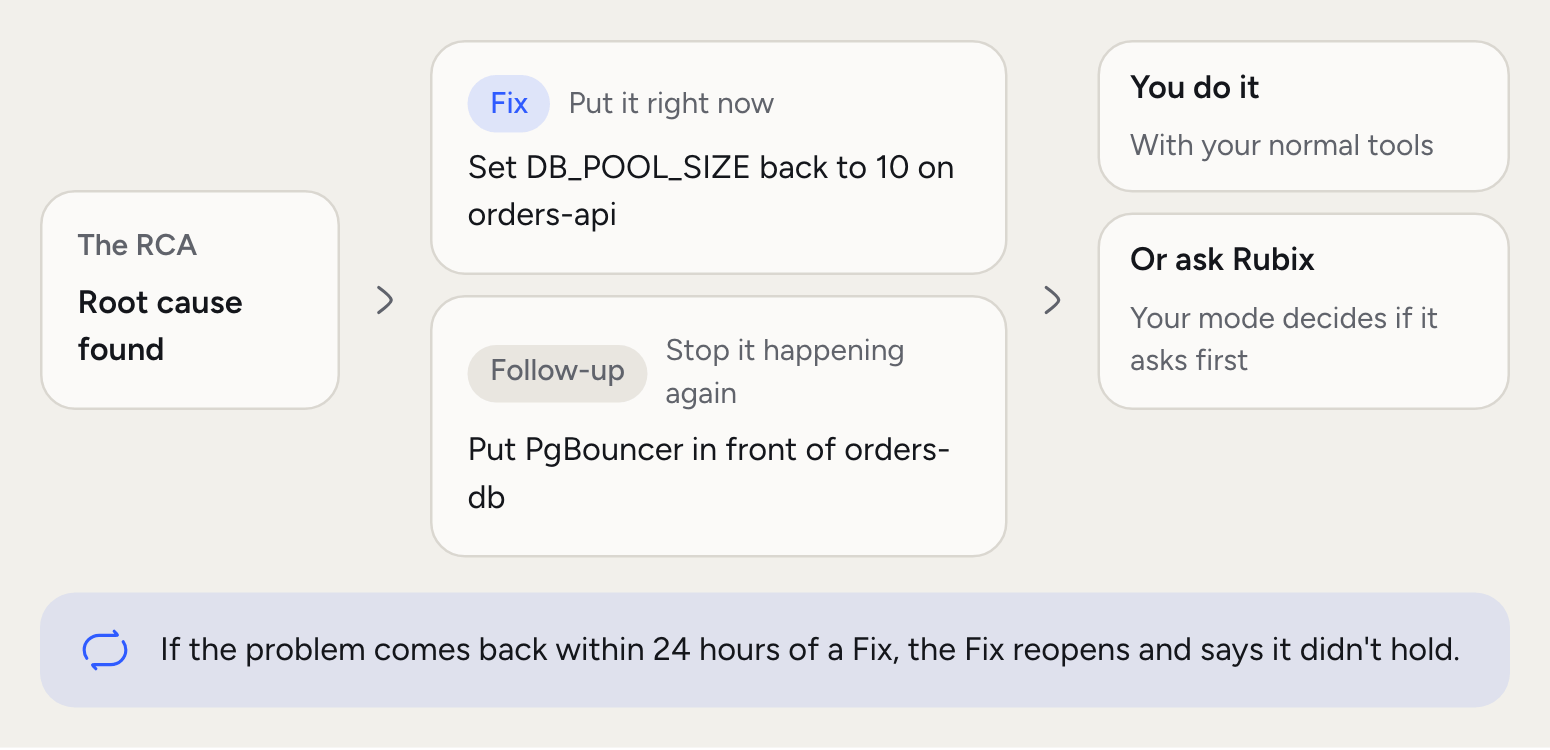
- Kind. Fix or Follow-up.
- Why Rubix suggested it. The reasoning from the RCA, on the Task’s page.
- Priority. Critical, High, Medium or Low.
- Owner. The person it’s assigned to.
- Where it came from. The incident and RCA behind it.
- A short code. TSK-30, unique in your organization.
The lifecycle of a Task
In progress
Work has started. From here it can move to Waiting when it’s blocked, or Review when someone needs to check it.
What can be a Task
Anything your team needs to do because of an incident. In our example:A Fix
A Fix
Set
DB_POOL_SIZE back to 10 on orders-api.A Follow-up
A Follow-up
Add an alert on
orders-db connections, and review pool settings when orders-api changes.How a Fix gets done
You have two ways.- Do it yourself. Follow the steps, using your normal tools, then move the Task along.
- Ask Rubix. In chat, ask Rubix to make the change through its connected tools. The mode decides what happens: Observe blocks it, Assist asks you first, and Auto goes ahead, with destructive actions still asking.
Good to know
The Task page keeps its status history, with who moved it and when, next to its comments. When Rubix makes a change, the tool call also appears in Settings > Activity. See Safety and control.Common questions
Can Tasks run without a person?
Can Tasks run without a person?
Tasks don’t run. Rubix can change things without asking only in Auto mode, and destructive actions still ask. See Safety and control.
What if a Fix doesn't work?
What if a Fix doesn't work?
Move the Task to Failed and add a comment, so the next RCA can read why. You can also run the RCA again from the incident.
Can I add my own Tasks?
Can I add my own Tasks?
Yes. Use Add task on the incident, or New task on the Tasks page.
Does a Task have a rollback?
Does a Task have a rollback?
A Task doesn’t carry one. The RCA report has a Rollback section when Rubix suggests one. Read it before you make the change.
Related concepts
Safety and control
What Rubix can change, and what gets recorded.
Tasks in the console
Where you assign and track Tasks.