

Settings > Permissions
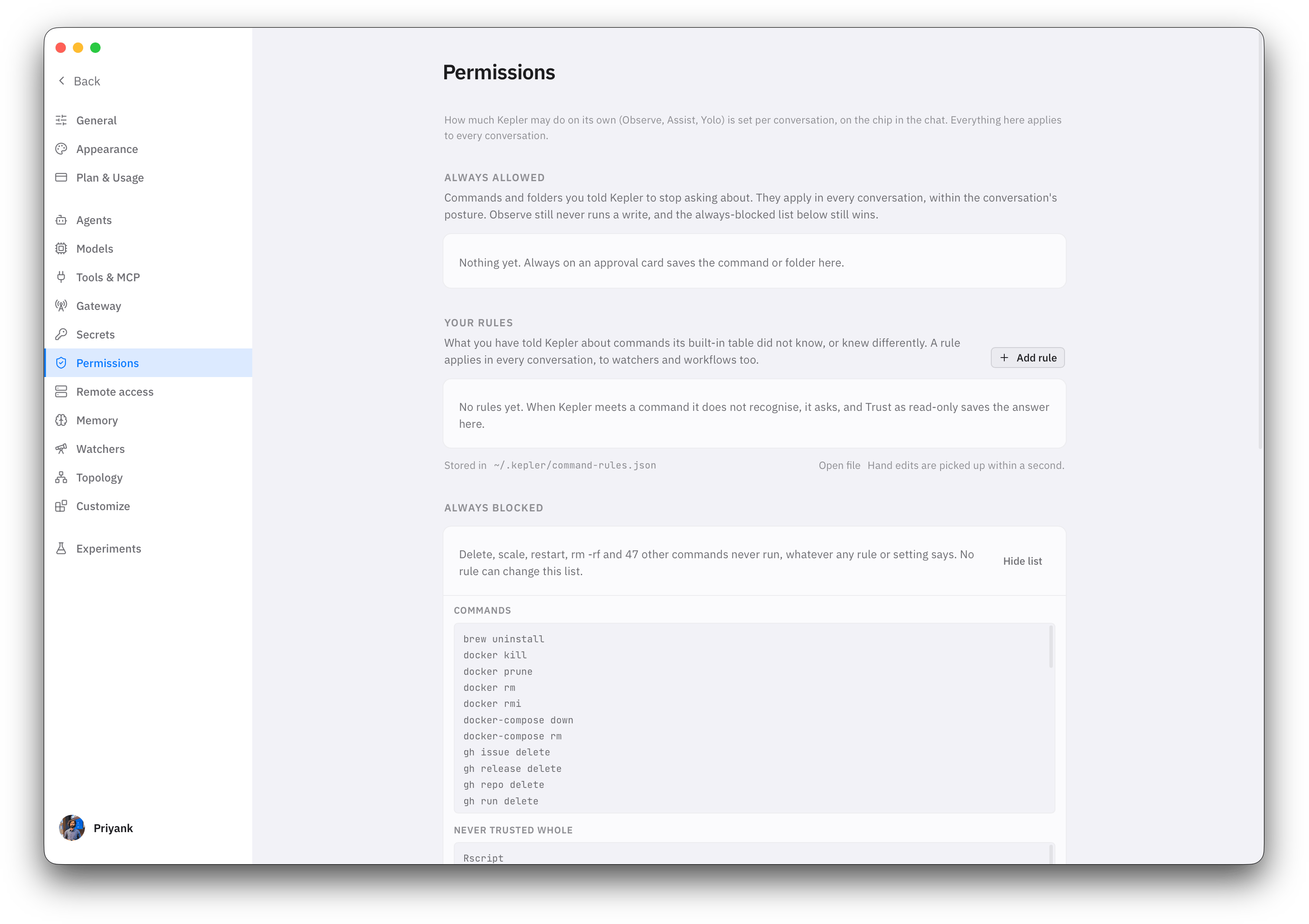
Open Settings > Permissions (Cmd+,, or /settings). The page has four parts, top to bottom: what you have allowed for good, your command rules, the always-blocked list, and the tool switches.
Tools
Each switch is Allow, Ask or Block. Allow never means writes run freely: it lets reads through without a prompt, and writes still follow the conversation’s posture.
The switches sit on top of posture and never loosen it. Shell on Allow in Observe still means no write command runs: Allow lets reads through without a prompt, and Observe keeps writes off the table. Shell on Ask in Yolo means Yolo asks about every command, which is the point of Ask.
Block removes the tool. Kepler is told it is unavailable and works around it or tells you it cannot continue.
Browser and memory tools are allowed by default. They are Kepler’s own surfaces, and the browser drives only what is on screen in the Browser panel.
Always allowed
Press Always on an approval card and the thing you approved stops asking, in every conversation, across restarts. This section lists what you have said that about. Two kinds of entry land here:
An entry here only removes the prompt. It never loosens the posture or the floor: Observe still runs no write, and the always-blocked list still wins. Remove an entry from its row when you no longer want it.
Always is not offered for shells and interpreters such as
bash or python, for the same reason This session is not: approving those would approve anything they run.
Your rules
Kepler ships with a table of what common commands do:kubectl get is a read, kubectl apply is a write, helm list is a read, and so on. That table decides whether a command runs silently, asks, or is refused in the current posture. When Kepler meets a command that is not in the table, it stops and shows the unknown-command card. Choosing Trust as read-only there writes a rule, and this section is where those rules live.
A rule is one line about one command shape:
Rules apply everywhere at once: chat, watchers, workflows, and
! shell mode. The table shows when each rule was added and whether it came from a card, from this page, or from a hand edit.
To add one without waiting for a card, click Add rule, fill in the binary and optional verb and sub-verb, pick the effect, and add any escalating flags. Search the table with the box above it, sort by any column, and change a rule’s effect in place from its row.
Editing the rules file by hand
The rules are a JSON file at~/.kepler/command-rules.json. Open it from the page and edit it in any editor. Kepler notices a changed file within a second and uses the new rules on the next command, with no restart.
Two things are refused, on the page and in the file. A rule that names a command on the always-blocked list is dropped. And a rule that trusts a whole shell or interpreter, such as bash, python, sudo or git, is refused: trusting bash would trust every script it runs. Those binaries appear under Never trusted whole in the floor, and you can only write rules for specific verbs of them.
Always blocked
The Always blocked panel at the bottom of the page lists the floor. Click Show list to expand it. It has three parts: the commands that are blocked, the binaries that can never be trusted whole, and the patterns that are checked before any rule or table lookup. No posture, no rule, no per-tool Allow and no approval unlocks anything on this list. Yolo does not run these. Trusting a binary does not run these. If Kepler concludes that one of them is the right fix, it tells you it is blocked and suggests the exact command for you to run yourself. It also applies to! shell mode in the composer, because the floor protects the machine, not just the agent.
The list in the app is the one that counts for your version. This table is a summary.
How the three layers meet
A singlekubectl command passes through all three before it runs:
1
The floor
If the command matches the always-blocked list, it stops here. Kepler is told it will never run.
2
Posture
Kepler works out whether the command is a read or a write, using the built-in table with your rules on top. A read runs in any posture. A write is unavailable in Observe, asks in Assist, and runs in Yolo. A command Kepler does not recognise asks in Assist and Yolo and is unavailable in Observe.
3
Permissions
The Shell switch is applied last and can only make things stricter. Ask adds a prompt even for a read. Block removes the shell entirely.
Where to go next
Postures
Observe, Assist and Yolo, and the approval dock.
Settings
Every settings page, including Tools & MCP and Secrets.
Watchers
Background pollers that only ever run read-only commands.
Troubleshooting
When a command will not run and you do not know why.