> ## Documentation Index
> Fetch the complete documentation index at: https://docs.rubixkube.ai/llms.txt
> Use this file to discover all available pages before exploring further.
# RCA Reports
> Evidence-linked root cause reports for every incident. Observed conditions, causal chain, recommended actions, and verification, all in one place.
An RCA Report is the output of a full investigation. When an insight has enough evidence for a single identifiable root cause, the RCA Pipeline Agent produces a report. These are the artefacts your team reviews, acts on, and references in post-incident writeups.
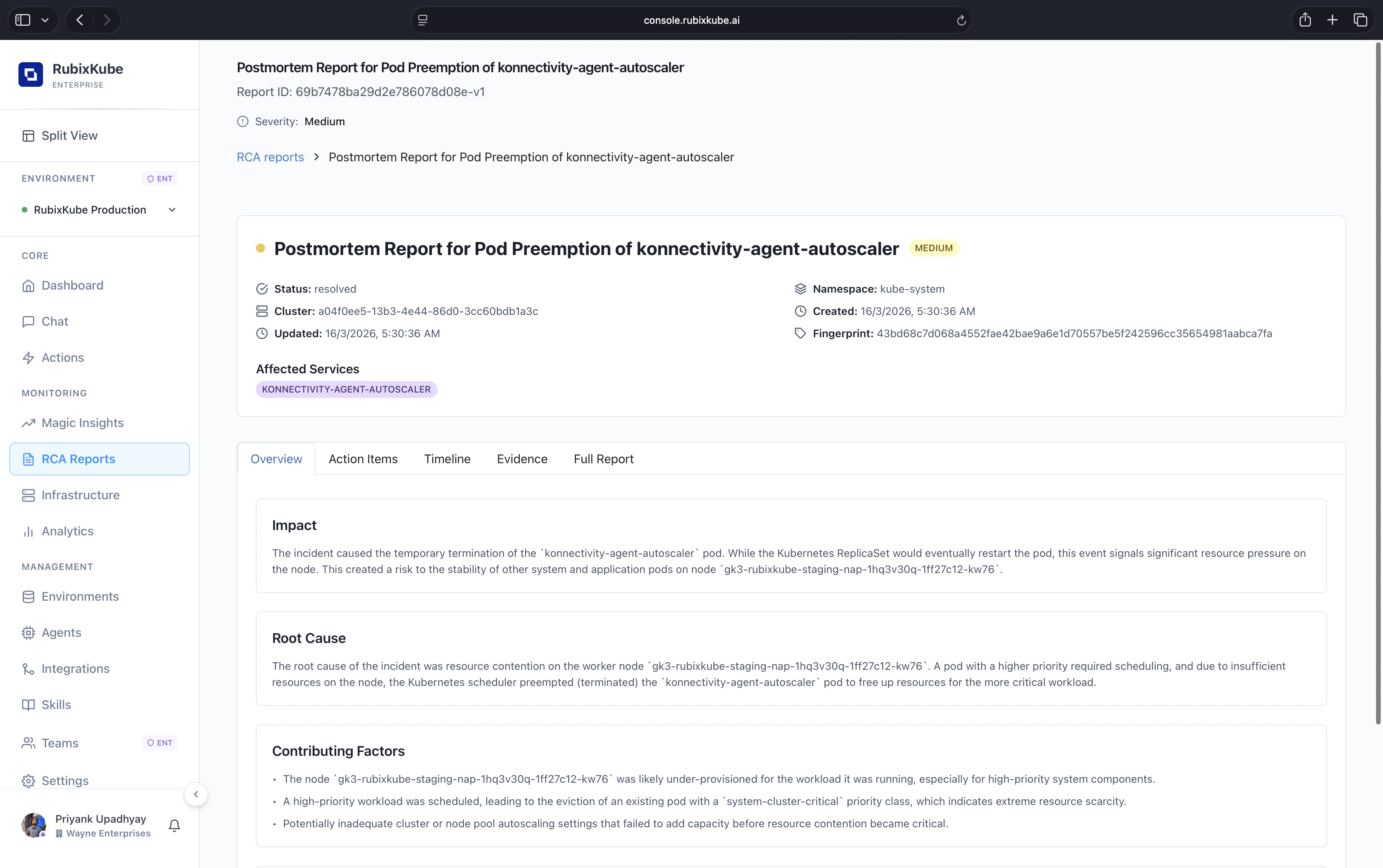 An RCA Report in the console. Metadata on top, then tabs for Overview, Action Items, Timeline, Evidence, and the Full Report. Every claim is grounded in the evidence tab.
## What is in a report
The state of the affected resources when the incident started. Snapshots of the metrics, events, and configuration that matter. Every data point is a clickable link back to the source.
Each link reads "A caused B because C". Every link cites the evidence behind it, so you can verify the reasoning rather than trust it blind.
Ranked fixes. Each one carries an expected blast radius, a recovery estimate, and a confidence score. High-confidence items sit at the top.
After an action runs, the stabilisation window is recorded on the report. Verified, partial, or rollback-suggested outcomes are all tracked.
Every status change, approval, applied action, and comment, with actor and timestamp. Ready for compliance review.
## How a report is born
A signal crosses a baseline the system has learned for your environment.
If the anomaly is material, an insight appears in **Magic Insights**.
If the insight has enough evidence for a single causal chain, the RCA Pipeline Agent takes over and produces a report.
Route it to Slack, Teams, or Linear via integrations, or assign an owner inside the product.
## What makes an RCA actionable
Click any line, jump to the underlying log or metric. No black-box reasoning.
Before approving, you see what changes, where, and for how long.
You know when a fix worked because the system keeps watching after the action ran.
Your resolution notes feed the Memory Engine. Similar incidents surface the same fix faster next time.
## Where RCA Reports fit in the flow
Where anomalies first surface. Not every insight becomes an RCA.
Where recommended actions get approved, applied, and tracked.
Full workflow from detection to verified fix.
Which agent does what inside the investigation pipeline.
## Common questions
Not every anomaly has a single identifiable root cause. Multi-cause incidents stay as insights, with the causal analysis inline. If you want a deeper dive, escalate from the insight card and Rubix will attempt a full RCA with the added context.
Usually thirty seconds to a few minutes, depending on how wide the causal search is. Large blast radius incidents take longer because more evidence has to be correlated.
Yes. Markdown export and a printable view are both available on the report detail page. Public share links are scoped and revocable.
Retention follows your plan: 7 days on Free, 30 days on Business, unlimited on Enterprise.
An RCA Report in the console. Metadata on top, then tabs for Overview, Action Items, Timeline, Evidence, and the Full Report. Every claim is grounded in the evidence tab.
## What is in a report
The state of the affected resources when the incident started. Snapshots of the metrics, events, and configuration that matter. Every data point is a clickable link back to the source.
Each link reads "A caused B because C". Every link cites the evidence behind it, so you can verify the reasoning rather than trust it blind.
Ranked fixes. Each one carries an expected blast radius, a recovery estimate, and a confidence score. High-confidence items sit at the top.
After an action runs, the stabilisation window is recorded on the report. Verified, partial, or rollback-suggested outcomes are all tracked.
Every status change, approval, applied action, and comment, with actor and timestamp. Ready for compliance review.
## How a report is born
A signal crosses a baseline the system has learned for your environment.
If the anomaly is material, an insight appears in **Magic Insights**.
If the insight has enough evidence for a single causal chain, the RCA Pipeline Agent takes over and produces a report.
Route it to Slack, Teams, or Linear via integrations, or assign an owner inside the product.
## What makes an RCA actionable
Click any line, jump to the underlying log or metric. No black-box reasoning.
Before approving, you see what changes, where, and for how long.
You know when a fix worked because the system keeps watching after the action ran.
Your resolution notes feed the Memory Engine. Similar incidents surface the same fix faster next time.
## Where RCA Reports fit in the flow
Where anomalies first surface. Not every insight becomes an RCA.
Where recommended actions get approved, applied, and tracked.
Full workflow from detection to verified fix.
Which agent does what inside the investigation pipeline.
## Common questions
Not every anomaly has a single identifiable root cause. Multi-cause incidents stay as insights, with the causal analysis inline. If you want a deeper dive, escalate from the insight card and Rubix will attempt a full RCA with the added context.
Usually thirty seconds to a few minutes, depending on how wide the causal search is. Large blast radius incidents take longer because more evidence has to be correlated.
Yes. Markdown export and a printable view are both available on the report detail page. Public share links are scoped and revocable.
Retention follows your plan: 7 days on Free, 30 days on Business, unlimited on Enterprise.