> ## Documentation Index
> Fetch the complete documentation index at: https://docs.rubixkube.ai/llms.txt
> Use this file to discover all available pages before exploring further.
# Run a war room
> Kepler's incident mode: Kepler leads, spawns agents that each work one angle of the incident in their own pane, and gathers approvals and findings in one place.
A war room is Kepler's mode for incidents. You describe what is breaking. Kepler takes the lead, brings in agents as it needs them, and each agent works one angle of the problem in its own pane beside the conversation. You watch all of them, approve what needs approving, and get one set of findings.
**Best for**
* An outage with more than one plausible cause, where you would normally have three people each chasing a theory.
* A bad deploy where someone needs to read the pods, someone the diff, and someone the dashboards, at the same time.
* Latency or behaviour that changed when nothing obvious shipped.
For a single question with a single thread of investigation, a normal session is faster. See [Everyday workflows](/kepler/workflows).
## Start a war room
Choose **New war room** in the sidebar. The landing asks one thing: **What are you seeing? A symptom is enough.**
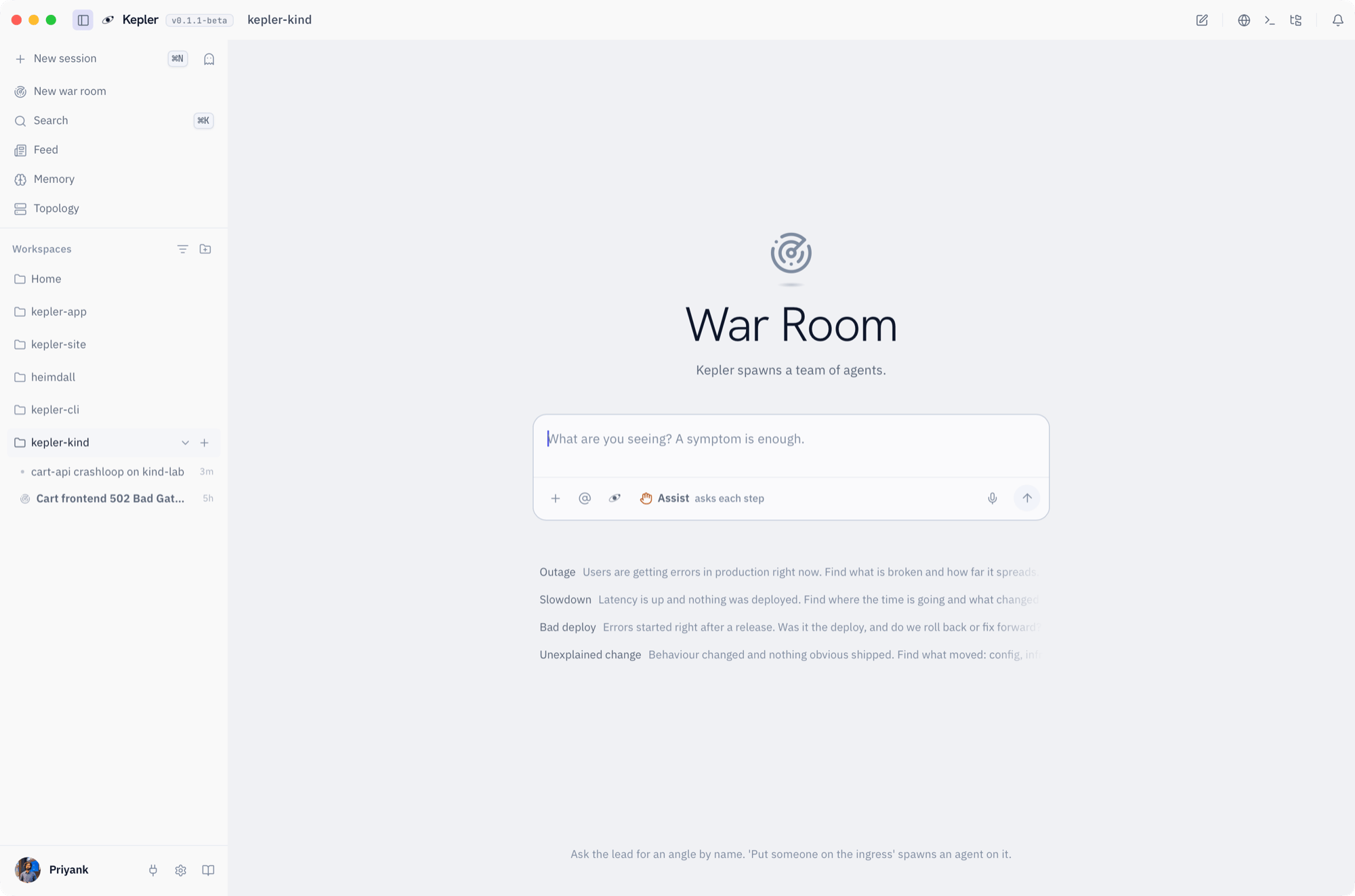 The war room landing. Pick a quick start or describe the symptom yourself.
Four quick starts fill the composer with an opening you can edit:
| Quick start | Opens with |
| ------------------ | ---------------------------------------------------------------------------------------------------- |
| Outage | Users are getting errors in production right now. Find what is broken and how far it spreads. |
| Slowdown | Latency is up and nothing was deployed. Find where the time is going and what changed underneath. |
| Bad deploy | Errors started right after a release. Was it the deploy, and do we roll back or fix forward? |
| Unexplained change | Behaviour changed and nothing obvious shipped. Find what moved: config, infra, dependencies or data. |
Clicking a chip inserts the text rather than sending it, because you have the specifics and the card does not. Add the service, the time, the cluster, then send.
A war room runs in **Assist** or **Yolo**, chosen when you open it. Observe is not offered here: the room exists so that members can work, and Observe would leave them unable to. The always-blocked list still applies to every member.
## Starter prompt
```
Checkout is returning 502s in prod since about 09:40. The api service deployed at 09:35. Find out whether the deploy is the cause, how many users are affected, and whether we roll back or fix forward.
```
## What you see
Kepler answers first as the lead, then spawns members as the investigation branches. Each member gets its own pane beside the conversation, with a name, a colour and its own transcript. Members persist: they keep their context and are re-entered as the room needs them, rather than answering once and disappearing.
The war room landing. Pick a quick start or describe the symptom yourself.
Four quick starts fill the composer with an opening you can edit:
| Quick start | Opens with |
| ------------------ | ---------------------------------------------------------------------------------------------------- |
| Outage | Users are getting errors in production right now. Find what is broken and how far it spreads. |
| Slowdown | Latency is up and nothing was deployed. Find where the time is going and what changed underneath. |
| Bad deploy | Errors started right after a release. Was it the deploy, and do we roll back or fix forward? |
| Unexplained change | Behaviour changed and nothing obvious shipped. Find what moved: config, infra, dependencies or data. |
Clicking a chip inserts the text rather than sending it, because you have the specifics and the card does not. Add the service, the time, the cluster, then send.
A war room runs in **Assist** or **Yolo**, chosen when you open it. Observe is not offered here: the room exists so that members can work, and Observe would leave them unable to. The always-blocked list still applies to every member.
## Starter prompt
```
Checkout is returning 502s in prod since about 09:40. The api service deployed at 09:35. Find out whether the deploy is the cause, how many users are affected, and whether we roll back or fix forward.
```
## What you see
Kepler answers first as the lead, then spawns members as the investigation branches. Each member gets its own pane beside the conversation, with a name, a colour and its own transcript. Members persist: they keep their context and are re-entered as the room needs them, rather than answering once and disappearing.
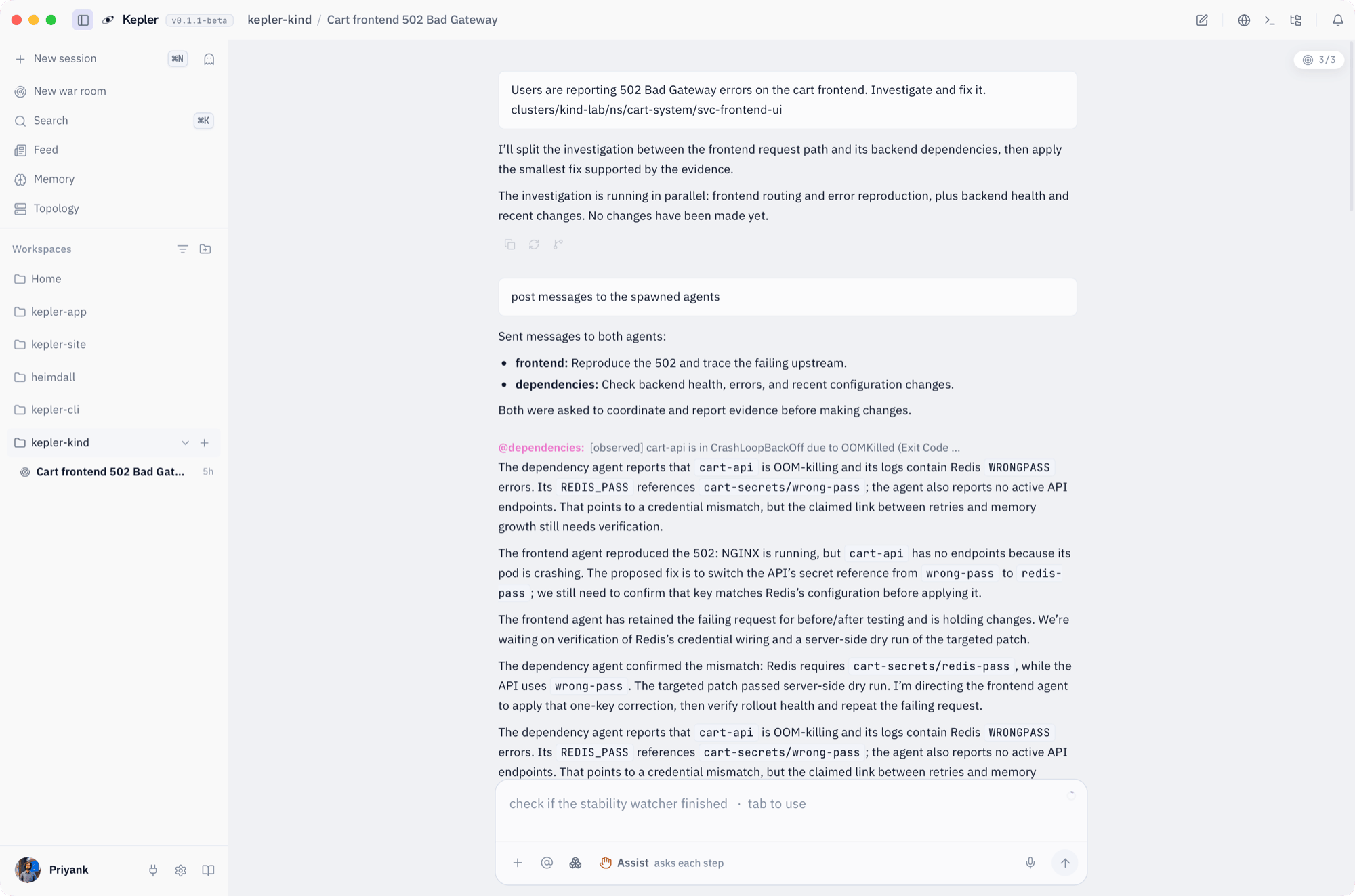 The lead's thread. Kepler briefs each member, relays what they find, and holds the change until the evidence lines up.
**Waiting on you** collects every pending approval from every member in one place, so you are never hunting through panes for the thing that is blocked on you. Bring one forward, read the exact command, and approve or decline it.
Findings a member pins land in the room where every other member can read them. That is how one agent's discovery that the deploy changed a ConfigMap reaches the agent reading the pod logs.
## What to expect
An illustrative run of the starter prompt above:
> **Kepler (lead):** Two things to establish first: whether the 502s correlate with the 09:35 rollout, and how many requests are failing. Spawning three members.
>
> **pods:** checkout-api has 4/6 pods Ready. Two pods restarting with exit code 137 since 09:36. Memory limit is 512Mi, and usage on the healthy pods is at 490Mi.
>
> **deploy-diff:** The 09:35 release bumped the image to v2.14.1 and raised the default page size from 50 to 500 in the ConfigMap. Nothing else changed.
>
> **dashboards:** Error rate rose from 0.2% to 11% at 09:37 on the checkout Grafana board. p99 doubled at the same minute. Traffic is flat, so this is not load.
>
> **Kepler (lead):** Pinned: the page-size change is the likely cause. The bigger responses push the pods past their memory limit and they are killed. Rolling back the ConfigMap value reverts the behaviour without a redeploy. This needs your approval: `kubectl apply` of the previous ConfigMap is waiting in the queue.
Your real run will differ. What stays the same is the shape: a lead that keeps the goal in view, members that each own one angle, pinned findings that cross between them, and one queue for approvals.
## Rules of the room
* Members share the room's posture and cannot widen it. A member cannot switch itself to Yolo.
* Only Kepler, as lead, spawns or stops members. Members can post findings and read the room, and nothing more.
* The always-blocked list applies to everyone in the room. See [Permissions](/kepler/permissions).
* Closing the room stops every member.
## Make it your own
```
Run a war room on the latency spike in payments. One angle on the database, one on the network path, one on what changed in the last 6 hours.
```
```
We just failed over the primary region. Open a war room to confirm every service came up healthy in the secondary and flag anything that did not.
```
```
The nightly batch job failed for the third time. War room: one member on the job's logs, one on the upstream data it reads, one on the cluster events overnight.
```
## Where to go next
Assist and Yolo, and what the approval dock shows you.
Single-thread investigations, triage and RCA.
Keep an eye on the fix after the room closes.
Where the room's findings go afterwards.
The lead's thread. Kepler briefs each member, relays what they find, and holds the change until the evidence lines up.
**Waiting on you** collects every pending approval from every member in one place, so you are never hunting through panes for the thing that is blocked on you. Bring one forward, read the exact command, and approve or decline it.
Findings a member pins land in the room where every other member can read them. That is how one agent's discovery that the deploy changed a ConfigMap reaches the agent reading the pod logs.
## What to expect
An illustrative run of the starter prompt above:
> **Kepler (lead):** Two things to establish first: whether the 502s correlate with the 09:35 rollout, and how many requests are failing. Spawning three members.
>
> **pods:** checkout-api has 4/6 pods Ready. Two pods restarting with exit code 137 since 09:36. Memory limit is 512Mi, and usage on the healthy pods is at 490Mi.
>
> **deploy-diff:** The 09:35 release bumped the image to v2.14.1 and raised the default page size from 50 to 500 in the ConfigMap. Nothing else changed.
>
> **dashboards:** Error rate rose from 0.2% to 11% at 09:37 on the checkout Grafana board. p99 doubled at the same minute. Traffic is flat, so this is not load.
>
> **Kepler (lead):** Pinned: the page-size change is the likely cause. The bigger responses push the pods past their memory limit and they are killed. Rolling back the ConfigMap value reverts the behaviour without a redeploy. This needs your approval: `kubectl apply` of the previous ConfigMap is waiting in the queue.
Your real run will differ. What stays the same is the shape: a lead that keeps the goal in view, members that each own one angle, pinned findings that cross between them, and one queue for approvals.
## Rules of the room
* Members share the room's posture and cannot widen it. A member cannot switch itself to Yolo.
* Only Kepler, as lead, spawns or stops members. Members can post findings and read the room, and nothing more.
* The always-blocked list applies to everyone in the room. See [Permissions](/kepler/permissions).
* Closing the room stops every member.
## Make it your own
```
Run a war room on the latency spike in payments. One angle on the database, one on the network path, one on what changed in the last 6 hours.
```
```
We just failed over the primary region. Open a war room to confirm every service came up healthy in the secondary and flag anything that did not.
```
```
The nightly batch job failed for the third time. War room: one member on the job's logs, one on the upstream data it reads, one on the cluster events overnight.
```
## Where to go next
Assist and Yolo, and what the approval dock shows you.
Single-thread investigations, triage and RCA.
Keep an eye on the fix after the room closes.
Where the room's findings go afterwards.