> ## Documentation Index
> Fetch the complete documentation index at: https://docs.rubixkube.ai/llms.txt
> Use this file to discover all available pages before exploring further.
# Kepler overview
> Kepler is RubixKube's desktop AI agent for SREs and on-call operators. Chat with your infrastructure, run read-only checks, drive a real terminal and browser, and keep a memory of every incident, all on your own machine.
**Kepler** is a desktop app for the people who keep systems alive: SREs, platform engineers, on-call operators. It looks like a chat window. It behaves like a careful colleague with a terminal, a browser, an editor, and a long memory of your infrastructure. Ask it what is wrong with a live system and it runs read-only commands, reads the dashboards you already have open, recalls what happened last time, and comes back with a diagnosis and a suggested fix. By default it suggests. You decide what runs.
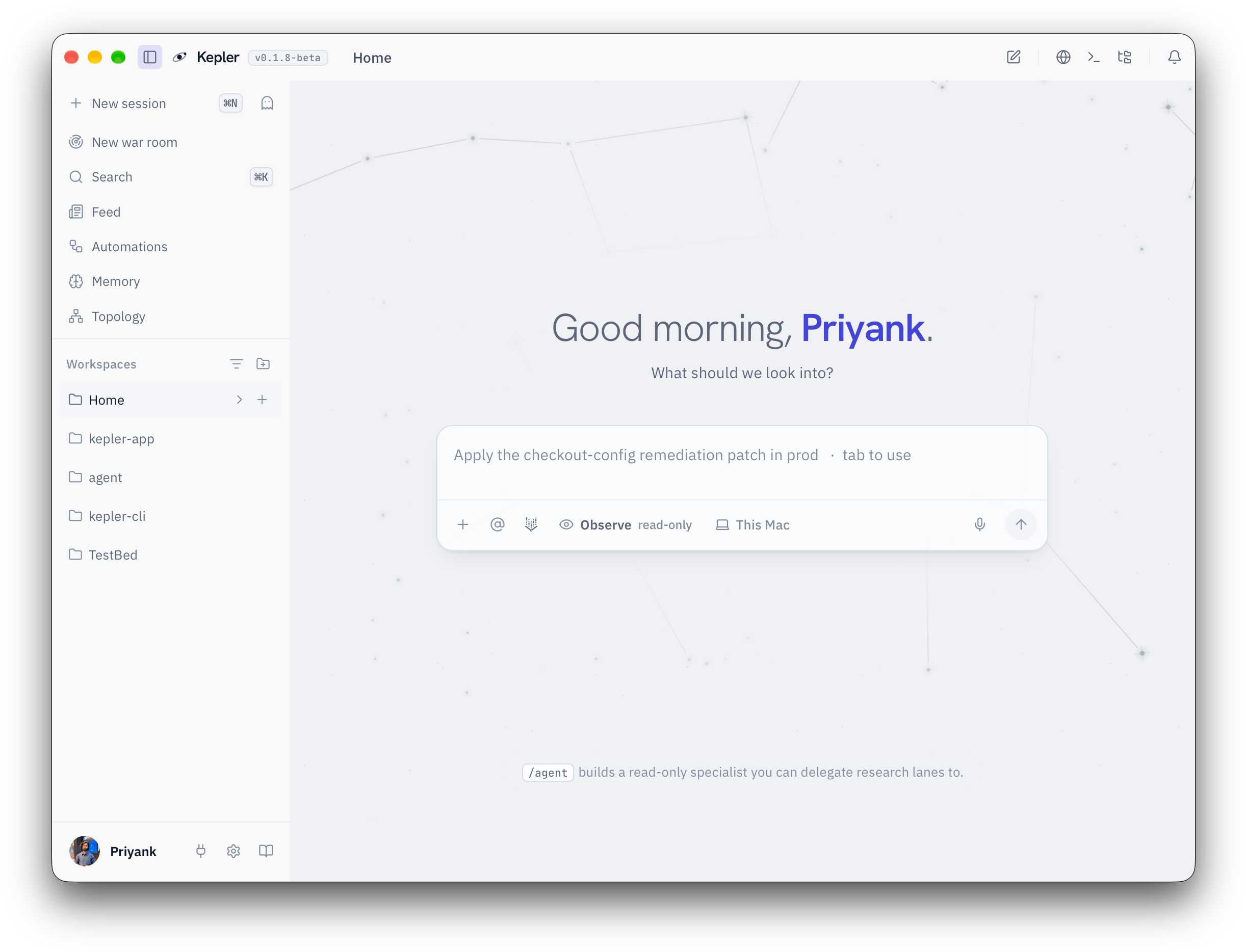 Where every day starts. The suggested prompt is Kepler picking up where yesterday's investigation left off.
## What can Kepler do?
Ask in plain English. Kepler runs kubectl, shell, and cloud reads, shows every command as a card, and answers with the output as evidence.
A full terminal panel (`Cmd+J`) that you and Kepler share. Click a command in the scrollback to send it and its output into chat.
A browser panel (`Cmd+B`) Kepler can read and drive. Log in to Grafana once, then ask "what did p99 do in the last hour?"
Services, incidents, runbooks, and your conventions accumulate locally. Day 30 Kepler knows things Day 1 Kepler had to ask about.
For an incident, Kepler leads and spawns specialist agents on separate angles, each in its own pane, with one shared approval queue.
"Keep an eye on the checkout rollout." A background check that costs nothing while quiet and wakes the conversation when something changes.
Connect WhatsApp, Slack, Telegram, or Discord and drive a session from wherever you are. Approvals work there too.
Bring your team's runbooks and formats as Markdown skills. Mint your own slash commands in one sentence.
## Kepler is for you when...
| I want to... | Use |
| -------------------------------------------------------------- | ------------------------------------------------------------------- |
| Find out why a service is unhealthy right now | Ask in chat, in Observe. Try `/investigate` or `/triage `. |
| Check a rollout, a dashboard, or a log without leaving the app | The terminal and browser panels. |
| Make a small, reviewed change | Switch to Assist and approve each command in the dock. |
| Write an RCA or an on-call handoff | `/rca ` or `/handoff`. |
| Get a written plan before anything runs | `/plan `, in any posture. |
| Run an incident with several angles at once | New war room from the sidebar. |
| Be told when something changes, without polling by hand | Ask Kepler to watch it. |
| Ask a question from the couch | Connect a channel and use `/otg`. |
| Work on a server or a cloud VM, not this laptop | Turn on Remote access and pick the machine beside Send. |
| Keep tribal knowledge somewhere the next person can find it | Memory, `kepler.md`, and saved runbooks. |
## What Kepler is not
* **Not a monitoring service.** Kepler does not collect metrics or store telemetry. It reads the tools you already have: kubectl, your cloud CLIs, Grafana, Prometheus, Datadog, and others through integrations.
* **Not APM.** There is no agent to install in your workloads and no data leaving your clusters to us.
* **Not a coding agent.** It can read and edit files in folders you grant, but it is built for operating live systems, not for shipping features.
* **Not a cloud service.** Kepler runs on your machine. Conversation history, memory, and settings stay there. The only outbound traffic is to the model you choose and to your own tools.
* **Not autonomous by default.** New conversations start in Observe, which is read-only. Assist and Yolo are opt-in, per conversation, and delete, scale, restart, and `rm -rf` stay blocked in every mode.
## How Kepler relates to RubixKube
Kepler is the desktop sibling of the [RubixKube platform](/getting-started/overview) and the [Rubix CLI](/cli/overview). The platform watches your environments continuously and produces insights and RCAs. Kepler runs on an operator's laptop, works with whatever access that laptop already has, and keeps its memory locally. If you use both, Kepler ships with RubixKube skills so you can ask "what's broken in production right now?" and get the platform's active issues, cluster health, and RCA reports inside the same chat.
You do not need a RubixKube platform account to use Kepler. A Kepler sign-in and a model are enough.
## Where to go next
Download for macOS, Windows, or Linux. Requirements and updates.
Sign in, connect a model, ask your first question, approve your first change.
Observe, Assist, and Yolo. What each one runs without asking.
Per-tool allow, ask, and block. Command rules and the always-blocked list.
Where every day starts. The suggested prompt is Kepler picking up where yesterday's investigation left off.
## What can Kepler do?
Ask in plain English. Kepler runs kubectl, shell, and cloud reads, shows every command as a card, and answers with the output as evidence.
A full terminal panel (`Cmd+J`) that you and Kepler share. Click a command in the scrollback to send it and its output into chat.
A browser panel (`Cmd+B`) Kepler can read and drive. Log in to Grafana once, then ask "what did p99 do in the last hour?"
Services, incidents, runbooks, and your conventions accumulate locally. Day 30 Kepler knows things Day 1 Kepler had to ask about.
For an incident, Kepler leads and spawns specialist agents on separate angles, each in its own pane, with one shared approval queue.
"Keep an eye on the checkout rollout." A background check that costs nothing while quiet and wakes the conversation when something changes.
Connect WhatsApp, Slack, Telegram, or Discord and drive a session from wherever you are. Approvals work there too.
Bring your team's runbooks and formats as Markdown skills. Mint your own slash commands in one sentence.
## Kepler is for you when...
| I want to... | Use |
| -------------------------------------------------------------- | ------------------------------------------------------------------- |
| Find out why a service is unhealthy right now | Ask in chat, in Observe. Try `/investigate` or `/triage `. |
| Check a rollout, a dashboard, or a log without leaving the app | The terminal and browser panels. |
| Make a small, reviewed change | Switch to Assist and approve each command in the dock. |
| Write an RCA or an on-call handoff | `/rca ` or `/handoff`. |
| Get a written plan before anything runs | `/plan `, in any posture. |
| Run an incident with several angles at once | New war room from the sidebar. |
| Be told when something changes, without polling by hand | Ask Kepler to watch it. |
| Ask a question from the couch | Connect a channel and use `/otg`. |
| Work on a server or a cloud VM, not this laptop | Turn on Remote access and pick the machine beside Send. |
| Keep tribal knowledge somewhere the next person can find it | Memory, `kepler.md`, and saved runbooks. |
## What Kepler is not
* **Not a monitoring service.** Kepler does not collect metrics or store telemetry. It reads the tools you already have: kubectl, your cloud CLIs, Grafana, Prometheus, Datadog, and others through integrations.
* **Not APM.** There is no agent to install in your workloads and no data leaving your clusters to us.
* **Not a coding agent.** It can read and edit files in folders you grant, but it is built for operating live systems, not for shipping features.
* **Not a cloud service.** Kepler runs on your machine. Conversation history, memory, and settings stay there. The only outbound traffic is to the model you choose and to your own tools.
* **Not autonomous by default.** New conversations start in Observe, which is read-only. Assist and Yolo are opt-in, per conversation, and delete, scale, restart, and `rm -rf` stay blocked in every mode.
## How Kepler relates to RubixKube
Kepler is the desktop sibling of the [RubixKube platform](/getting-started/overview) and the [Rubix CLI](/cli/overview). The platform watches your environments continuously and produces insights and RCAs. Kepler runs on an operator's laptop, works with whatever access that laptop already has, and keeps its memory locally. If you use both, Kepler ships with RubixKube skills so you can ask "what's broken in production right now?" and get the platform's active issues, cluster health, and RCA reports inside the same chat.
You do not need a RubixKube platform account to use Kepler. A Kepler sign-in and a model are enough.
## Where to go next
Download for macOS, Windows, or Linux. Requirements and updates.
Sign in, connect a model, ask your first question, approve your first change.
Observe, Assist, and Yolo. What each one runs without asking.
Per-tool allow, ask, and block. Command rules and the always-blocked list.